


What Does the Line vs Inst Switch Actually Do?
The Scarlett 2i2 line vs inst toggle confuses a lot of new users. You plug in your guitar, the sound comes out thin and lifeless. Or you connect a synth and get nothing but clipped distortion. Nine times out of ten, that switch is set wrong.
Here’s the short version: Line mode expects a strong, pre-amplified signal from keyboards, mixers, or audio processors. Inst mode is built for weaker signals from passive guitar and bass pickups. Get this wrong, and your recordings suffer.
This guide breaks down exactly when to use each setting, what’s happening inside the interface, and how to fix the most common problems.
Understanding Signal Levels on the Scarlett 2i2
Audio signals come in three basic flavors, and each requires different treatment. Your Scarlett 2i2 handles all of them, but you need to tell it which one you’re feeding through that 1/4″ jack.
Mic Level
Microphones produce the weakest audio signal of the bunch. The XLR inputs on the back of your 2i2 are designed for this. When you plug in an XLR cable, the interface automatically engages its mic preamp and boosts the signal to a usable level. No switch needed here.
Instrument Level
Electric guitars and basses with magnetic pickups sit in the middle. They’re stronger than mic level but still need a boost. These signals also have high impedance – meaning they need a specialized input that won’t color the tone or drain the signal. The Inst setting handles this by changing both the gain structure and the input impedance.
Line Level
Keyboards, drum machines, synthesizers, and DJ mixers put out the strongest signal. They’ve already been amplified internally and are ready to record. Using the Inst setting here would be like turning up the volume on something that’s already loud. You’d get clipping and distortion.

How the Inst Button Changes Your Input
Pressing the Inst button does two things at once. First, it raises the input impedance to around 1 megohm (1MΩ). Second, it adjusts the gain staging to handle a weaker incoming signal.
Why does impedance matter? Passive guitar pickups are basically magnets wrapped in wire. They create a tiny electrical current when the strings vibrate. That current is weak and easily affected by whatever it connects to.
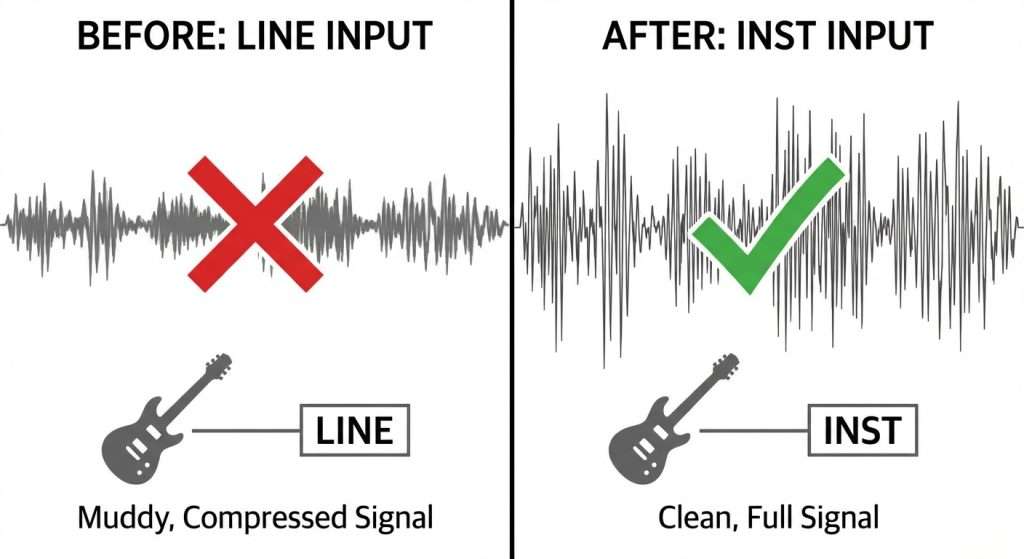
Plug into a low-impedance input (like Line mode), and the signal gets loaded down. High frequencies disappear. The tone turns muddy. Some call this “tone suck.” The high-impedance Inst input prevents this by presenting very little resistance to the incoming signal.
Technical Specs Breakdown
The 4th generation Scarlett 2i2 lists these input specifications:
- Line input impedance: 60kΩ (kilohms)
- Instrument input impedance: 1MΩ (megohm)
- Maximum line input level: +22 dBu
- Maximum instrument input level: +12 dBu
- Instrument gain range: 62dB
Notice that the instrument input expects a weaker signal (only +12 dBu maximum) but offers higher impedance. That combination is specifically designed for passive pickups.

When to Use Line Mode
Keep the Inst button off (white indicator on 4th gen models) when connecting:
- Synthesizers and keyboards
- Drum machines and groove boxes
- DJ mixers
- External preamps
- Multi-effects processors with line outputs
- Audio from other interfaces or mixing boards
- Media players and computers (via line out)
These devices output strong, pre-amplified signals. Using Inst mode would boost them too much, causing clipping. The lower impedance of Line mode is fine for these sources since they don’t have the sensitivity issues that passive pickups do.
When to Use Inst Mode
Press the Inst button (green indicator on 4th gen) for:
- Electric guitars with passive pickups
- Bass guitars with passive pickups
- Acoustic guitars with piezo pickups
- Electric violins and other stringed instruments with magnetic pickups
- Some older keyboards with instrument-level outputs
The high-impedance input preserves the full frequency range of your pickups. Your guitar should sound bright, full, and detailed – not muffled or dull.
Active Pickups: A Special Case
Guitars with active pickup systems (EMG, Fishman Fluence, etc.) include a built-in preamp powered by a 9V battery. This preamp boosts the signal and lowers the impedance. Some players find these work better on the Line setting, while others stick with Inst.
Try both and listen. Active pickups have lower output impedance than passive ones, so they’re less affected by the input impedance mismatch. If you’re getting a hot signal that clips easily, switch to Line. If the tone sounds thin or lifeless, go back to Inst.
Scarlett 2i2 Line vs Inst – Common Problems and How to Fix Them
Guitar Sounds Muddy or Quiet
You’ve probably got the switch in Line mode. Press Inst. The high impedance input will restore the treble and presence. Focusrite’s own documentation confirms that connecting a guitar without Inst enabled results in “muddy and quiet” sound.
Synth is Distorting and Clipping
The Inst button is on when it should be off. That extra gain is pushing the signal into the red. Turn off Inst (white indicator) and reduce the gain knob if needed.
Signal is Too Weak Even with Gain Maxed
Check your cable first. A broken cable causes more problems than anything else in home studios. If the cable is good, make sure you’re using the right mode for your source.
For guitars: Inst should be on. If it’s still too quiet, check the volume knob on the guitar itself. For synths: Line mode, but verify the synth’s output level isn’t set too low.
Hum or Buzz in the Recording
This usually isn’t related to the Line/Inst switch. Common causes include ground loops, single-coil pickups, or interference from monitors and power supplies. Try moving your guitar further from the computer screen. If you’re using single coils, position yourself to minimize the hum (often facing or away from certain directions helps).
The XLR Input Works Differently
Something that trips up new users: the Line/Inst switch only affects the 1/4″ jack input. It does nothing to the XLR microphone input on the back panel.
The Scarlett 2i2 uses Neutrik combo connectors that accept both XLR and 1/4″ cables. But these are actually two separate circuits:
- XLR input: Mic-level signal, fixed mic preamp, can receive 48V phantom power
- 1/4″ jack input: Line or instrument level, controlled by the Inst switch
Plugging a 1/4″ cable into the front panel automatically disables the corresponding XLR input on the back. This prevents accidentally sending 48V phantom power to your guitar or keyboard.
Setting Up for Recording: Step by Step
Here’s the process for getting a clean signal into your DAW:
- Connect your instrument or line source to Input 1 or 2 using a 1/4″ cable
- Select the correct input by pressing the Select button (number lights green)
- Set the Inst button according to your source – green for guitars/basses, white for synths/mixers
- Turn the gain knob while playing your loudest passage
- Watch the gain halo – aim for green with occasional flashes of amber
- Avoid red, which indicates clipping
The 4th generation Scarlett 2i2 includes an Auto Gain feature. Press the Auto button, play for about 10 seconds, and the interface sets the level automatically. It targets around -18dB, leaving plenty of headroom.
Using Both Inputs Simultaneously
The Scarlett 2i2 has two independent input channels. You can use different settings on each one. This is helpful when recording guitar and vocals at the same time, or when layering a DI guitar signal with an amp mic.
Each channel has its own Inst button and gain control. Press Select to toggle between channels, then adjust the settings for each one individually.
Recording Stereo Keyboards
Connect the left output of your keyboard to Input 1 and the right output to Input 2. Use two TRS cables for balanced connections. Keep Inst off on both channels. Set matching gain levels for both inputs to preserve the stereo image.
Frequently Asked Questions
Does the Inst button affect recording quality?
Using the correct setting gives you a cleaner, fuller signal. The wrong setting degrades quality – either through impedance mismatch (guitars through Line) or clipping (synths through Inst).
Can I damage my interface by using the wrong setting?
No. The worst that happens is a bad recording. You won’t hurt the hardware. That said, always check your gain levels before recording to avoid digital clipping.
Should acoustic guitar pickups use Line or Inst?
Most acoustic guitar pickups are piezoelectric or magnetic, both high-impedance sources. Use Inst mode. If your acoustic has an onboard preamp with a battery, you might experiment with Line mode to see if it sounds better.
Why does my direct guitar sound different from my amp?
Guitar amps color the tone significantly through their preamp, EQ, speakers, and cabinet. A direct signal into your interface is completely clean and uncolored. You’ll usually need amp simulation software or plugins to get that familiar guitar sound.
Does this apply to all Scarlett interfaces?
Yes. The Solo, 2i2, 2i4, 4i4, and larger Scarlett models all use the same Line/Inst concept. Button labels and locations vary slightly between generations, but the function is identical.
Quick Reference Chart
| Source | Setting | Why |
|---|---|---|
| Electric guitar (passive pickups) | Inst | High impedance preserves tone |
| Bass guitar (passive pickups) | Inst | Same as guitar |
| Electric guitar (active pickups) | Inst or Line | Try both – active pickups vary |
| Acoustic guitar (piezo pickup) | Inst | Piezo pickups are high impedance |
| Synthesizer/keyboard | Line | Line-level output, no boost needed |
| Drum machine | Line | Line-level output |
| DJ mixer | Line | Already amplified |
| External preamp | Line | Already amplified to line level |
| Effects processor (line out) | Line | Processed signal at line level |
Final Thoughts
The Scarlett 2i2 line vs inst switch exists because different audio sources need different treatment. Guitars want high impedance and extra gain. Keyboards and processors want a clean, direct path without extra amplification.
Match the setting to your source and you’ll get the cleanest possible signal into your DAW. Get it wrong and you’re fighting an uphill battle with tone, noise, and clipping.
When in doubt, remember: passive pickups go to Inst, everything else goes to Line.
